
How to Design Room Rates in Bistone HMS Full Board Version
The Simplest Rate Engine for Complex Packages
Unlike systems that force you to bundle items (meals, tickets, activities) one by one, Bistone HMS Full Board Version lets you define any package with just a price. Configure the 5 most essential rate structures below in minutes—no complex linking required. It's why growing resorts choose us for flexibility and speed.
From Simple to Sophisticated: 5 Essential Rate Plans
Follow these real-world examples to match your business model. Each is configured in the same intuitive Edit Rate Plan dialog.
Understanding "Rate Base"
Before you start, you need to understand one key concept: the Rate Base. It defines which guests are already covered by the base room rate. Any guest beyond the Rate Base is charged at the corresponding per-person rate.
In the Edit Rate Plan dialog, the Rate Base is set in the leftmost dropdown of the rate table. Choosing the right Rate Base determines how the system calculates the total for each reservation:
| Rate Base Setting | What It Means | Typical Use Case |
|---|---|---|
| Max Adult Num | All adults up to the room's maximum occupancy are covered by a single nightly rate. Children and infants may have their own rates. | Standard hotel rooms sold per night, where the price stays the same regardless of how many adults stay. |
| 1 guest | Only 1 guest is covered by the base rate. Every additional guest (including the 2nd adult) is charged separately. | All-inclusive resorts where every guest (adult, child, infant) has an individual cost. |
| <= 2 guests | Up to 2 guests are covered. The 3rd and later guests are charged at the Additional / Child / Infant rate. | Villas or family suites with a base price covering the first 2 guests, plus fees for extras. |
Tip: If your room price doesn't change based on the number of guests, use Max Adult Num. If every guest adds to the cost, use 1 guest. If a group of 2 is included but extras pay more, use <= 2 guests.
| Rate Plan Example & Use Case | Configuration Steps in Bistone HMS |
|---|---|
The Core Idea: Price, Don't BundleRemember: You are setting the total package price in each field. Whether that price covers meals, internet, dive tickets, or spa access is your business logic. The system doesn't need to know the details—it just accurately calculates the total based on guests and nights. This is what makes setup incredibly fast. |
|
1. Simple Flat Room RateBest for: Standard rooms sold per night, regardless of occupancy. Double Room:Max Adults: 2, Max Children: 1, Max Infants: 1 Rate: $100.00 / Night No additional per-person fees. |
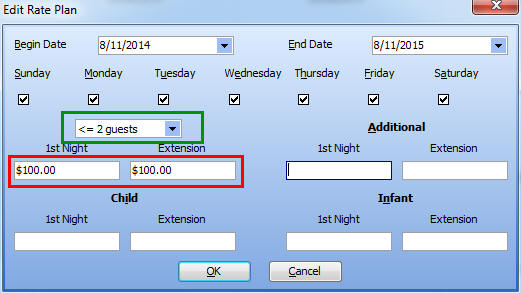
Configuration Steps:
|
2. Room Rate + Fixed Add-on FeeBest for: Bundling a mandatory service (e.g., Internet, Breakfast) with the room. Double Room:Max Adults: 2, Max Children: 1, Max Infants: 1 Room Rate: $100.00 / Night Internet Fee: $20.00 / Night Total Guest Charge: $120.00 / Night |
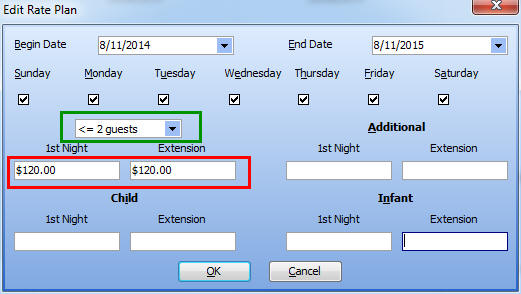
Configuration Steps:
|
3. Pure Per-Person PricingBest for: All-inclusive resorts where every guest has a cost. Double Room:Max Adults: 2, Max Children: 1, Max Infants: 1 Per Adult: $80.00 / Night Per Child: $60.00 / Night Per Infant: $30.00 / Night |
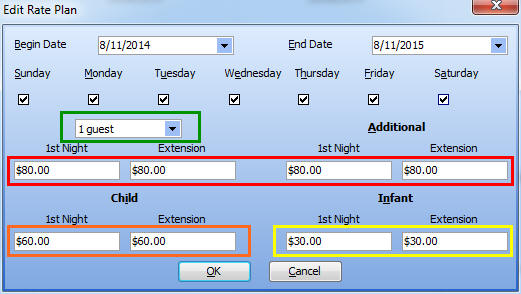
Configuration Steps:
|
4. Base Rate + Additional Guest FeesBest for: Villas or suites where a base price covers a group, with fees for extras. Villa:Max Adults: 4, Max Children: 2, Max Infants: 2 Base Rate (Includes 2 Adults): $300.00 / Night Per Additional Adult: $80.00 / Night Per Child: $60.00 / Night Per Infant: $30.00 / Night |
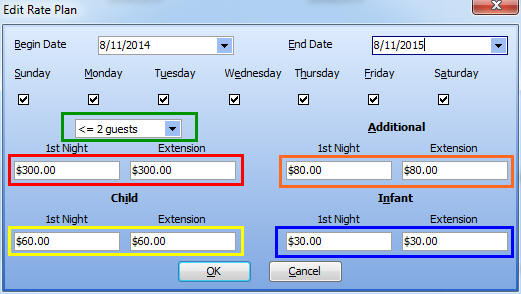
Configuration Steps:
|
5. Complex Rates (Different First/Extension Night)Best for: Promotional pricing (e.g., first night discount) or minimum stay requirements. Villa:Max Adults: 4, Max Children: 2, Max Infants: 2 Base Rate (Includes 2 Adults): First Night: $300.00 Extension: $280.00/Night Per Additional Adult: First Night: $80.00 Extension: $70.00/Night Per Child: First Night: $60.00 Extension: $50.00/Night Per Infant: First Night: $30.00 Extension: $20.00/Night |
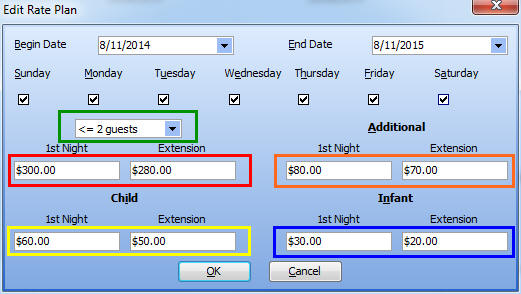
Configuration Steps:
|
Put This Guide Into Action & Secure Your Work
Full-featured, no limits. Trial data can be retained.
Lock in your pricing strategy & ensure continuity.